How to join your support channel in Zoho Cliq
Accept your Zoho Cliq invite and join your private ZeitRide support channel in a few minutes. It's free, and the one button to pick is Setup your business.
Last updated October 26, 2026
ZeitRide support can set up a private chat channel for your company in Zoho Cliq. It's a direct line to the ZeitRide team for quick questions and updates. Only your invited people and the ZeitRide team are in it.
Your channel is named like ZR-YourCompany-code. Zoho Cliq is free for you, and we never ask for payment in Cliq.
Join your channel
- Find the invite email. Zoho Cliq sends an email that says someone "invited you to join #ZR-YourCompany-…". Open it and click Join.
- Sign in or create a free Zoho account. Use the same email address the invite was sent to.
- Already have a Zoho account with that email? Sign in.
- New to Zoho? Create a free account with that email.
- Choose Setup your business. Cliq now shows Let's get you started! with two buttons. Click Setup your business, then type your company name. This is free.
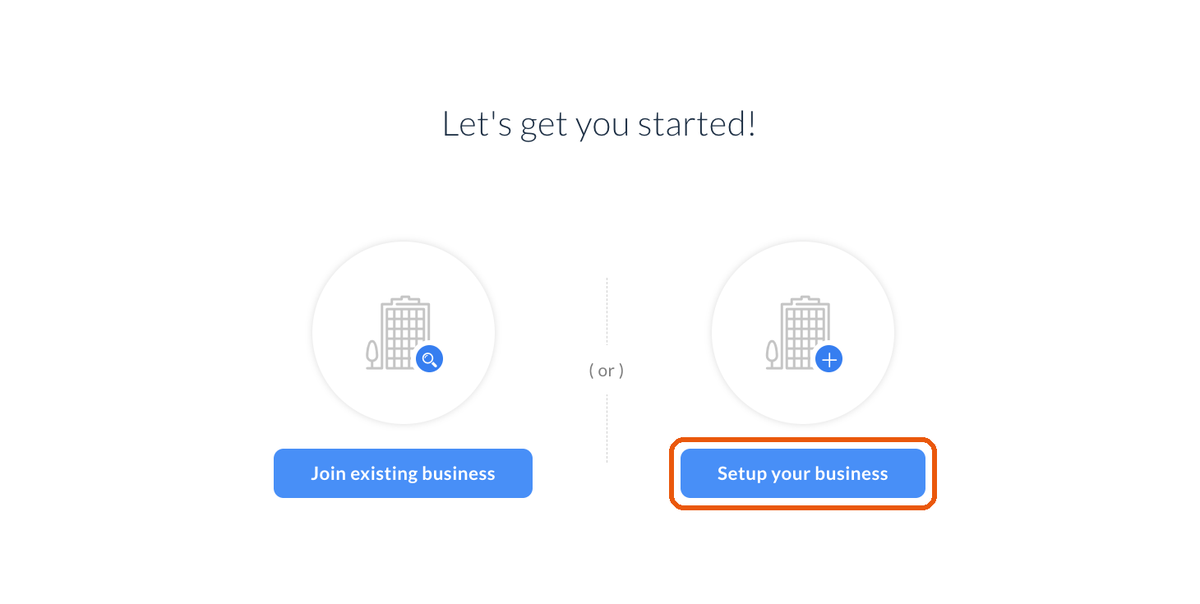
Important: Do not click Join existing business. That button is for joining another company's Cliq workspace, and it won't take you to your support channel.
- Open the invite again. Go back to the invite email and click Join (or open the channel link we sent you). You'll land right in your support channel. Say hello, and we'll take it from there.
Use Cliq on your phone or computer
You can also chat from the Zoho Cliq app for iPhone, Android, Mac, or Windows. Search for "Zoho Cliq" in your app store, then sign in with the same email you used above. Your support channel will be there too.
Having trouble?
- I didn't get the invite email. Check your spam or junk folder for an email from Zoho Cliq. Still nothing? Email support@zeitride.com and we'll send it again.
- I signed in with a different email. The invite only works for the email it was sent to. Sign out of Zoho, then open the invite again and sign in (or sign up) with that email. If you'd rather use another address, email support@zeitride.com and we'll invite that one instead.
- I clicked Join existing business by mistake. Sign out of Zoho Cliq, open the invite email again, and this time choose Setup your business. If you get stuck, email support@zeitride.com.
- The channel link says I don't have access. Finish steps 1–3 first. The link only works after your account is set up with the invited email.
Prefer to stay in the portal? You can always open a ticket instead. See Getting support.
Still stuck? The ZeitRide team is one message away.